
Who is this for: iOS users
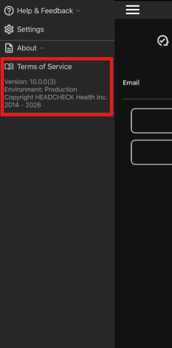
You can easily check which version of the HEADCHECK app is installed on your device, and you do not need to be logged in to view this information.
To find your current app version:
-
Open the HEADCHECK app
-
Tap the main menu in the top left-hand corner
-
Select About and the app version will be listed
To confirm whether you’re running the latest version, visit the Apple App Store and search for HEADCHECK. The most recent version number will be displayed there. If the version listed in the App Store matches the one shown in your app, you’re all set. If not, please update to the latest version available.
Keeping your HEADCHECK app up to date ensures you have access to the newest features, performance improvements, and bug fixes. Regular updates also help prevent syncing or compatibility issues, so the app continues to function as expected.