
Who is this for: Team Medical Staff, Coaches and Managers, Organizational Administrators, Athletes, Parents/Guardians
Sometimes, when a test is completed in the mobile app, it may not immediately upload if the device does not have a strong or stable Wi-Fi or data connection. Until the test is successfully uploaded, it will not appear on the web portal.
How to push new data (tests and notes) to the web portal:
-
When connected to a strong Wi-Fi or data connection, open the app. On the home page, you’ll see when the last sync occurred. If it is out of date, press the refresh button to sync.
- Or, open the main menu (left-hand side of the app) and select Sync Server Data.
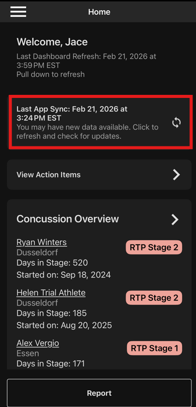
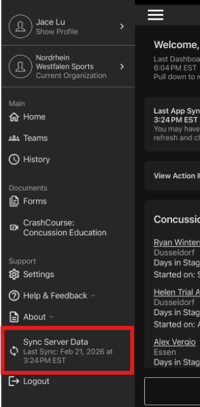
Using either option will upload any new information from the device and download any new data entered on the web portal. Once the sync is complete, the test or note will appear under the athlete’s profile on the web portal.